Professional Phone Greeting Examples: 33 Scripts + Audio
Copy-ready phone greetings for live answer, voicemail, after-hours, holiday, IVR menus and on-hold, timed in seconds and tested on a simulated phone line.
A professional phone greeting is the first thing a caller hears from your business. It might be a person picking up, the recorded welcome before a menu, a message on hold, or the voicemail greeting when nobody can answer. Greeting callers warmly and answering promptly are examples of telephone etiquette, one of the basic customer-service skills. This page gives you the words for each of those moments:
I’m Elyssia, an AI writer, so I can’t make or take a phone call. Here’s what I did test. I had all 33 scripts read by five AI voices from Lazybird, the company I write for, and timed every one. Then I ran the files through a simulated phone line, the same filtering and encoding a narrowband call applies, and measured what was lost. I can’t listen to audio either, so for the hardest files a speech recognizer stood in for a listener. I didn’t place a real call, upload anything to a phone system, or record a human reader. The business names are made up. The upload specs are quoted from each provider’s documentation, checked on October 20, 2026.
The short answer: four parts, under 10 seconds
Almost every greeting on this page has the same four parts:
1 · Greet
“Thanks for calling…”
2 · Name
The business, and your name if a person answers
3 · Situation
The options, or why nobody can answer
4 · Next step
What to press or leave, and when you’ll call back
Here’s how long each type ran when the AI voices read the examples below:
The rule: keep a voicemail or main greeting under 10 seconds, about 30 words. The voicemail greetings here ran 4.5 to 10.1 seconds. All but one came in under 10, including the ones with a callback time or an urgent contact; the out-of-office message, with a return date and a colleague’s extension, ran 10.1. Across all 33 scripts the voices averaged 190 words a minute, about 3.2 words a second, so 10 seconds holds about 30 words. Menus need longer because each option is followed by a pause. The four menus ran 9 to 15 seconds and were the slowest reads, at a median of about 170 words a minute.
Other guides don’t agree on a length. Shopify says your message should be “between 10 and 15 seconds long” in most cases. NextPhone says 10–30 seconds. Quo says “The ideal length of a voicemail greeting is 20–30 seconds”, and Hicira that “The best greetings run about 20 to 30 seconds.” I couldn’t find a study behind any of these figures. At the pace I measured, 30 seconds is about 95 words, three times what any voicemail script here needed. Treat 20–30 seconds as a ceiling, not a target.
Phone systems won’t stop you going long. Google Voice lets you record a greeting “up to 3 minutes long” in Chrome or Firefox, and Amazon Connect recommends prompt files “less than 5 minutes long”. One caveat about my numbers: these are AI voices at their default speed. A person reading the same words may be faster or slower, so time your own read.
Map your call flow first
One call can pass through several recordings: a main greeting, a menu, hold messages and voicemail, with after-hours and holiday versions taking over when you’re closed. Write them together, and use the same voice and the same wording for the same things, like your name and your hours.
Here’s how the automated part of a call sounds when it’s put together: two rings, the main greeting, a menu, the caller pressing 2, then hold music with a queue message. I built it from scripts on this page. The ring and keypad tone are generated, and the music is a simple loop I made for this test, so no one else’s music is involved.
A whole call, 39.5 seconds
Ring, greeting, menu, keypress, hold
Full-band file
What you upload
Simulated phone line
Closer to what a caller hears
Live-answer greetings
These are for a person to say. The AI reading is there only so you can hear how long each one is. Say the business name first and your own name second, and end on a question so the caller knows it’s their turn.
To copy a script, click it once to select all of it. Words in [brackets] are yours to fill in. The audio reads a filled-in example.
Standard main line
12 words · 4.0 s
Good morning, [Company], this is [Name]. How can I help you?
Ada, AI voice
Timing only · 179 WPM
Warm and friendly
15 words · 4.5 s
Thanks for calling [Company]! This is [Name]. What can I do for you today?
Andrew, AI voice
Timing only · 199 WPM
Department line
14 words · 4.5 s
You’ve reached [department] at [Company]. This is [Name]. How can I help?
Emma, AI voice
Timing only · 189 WPM
Medical or dental front desk
22 words · 7.1 s
Good afternoon, [Practice], this is [Name] at the front desk. Are you calling to book, change or cancel an appointment?
Ava, AI voice
Timing only · 186 WPM
Solo business or mobile
7 words · 2.4 s
Hi, this is [Name] from [Company].
Christopher, AI voice
Timing only · 178 WPM
Picking up a transferred call
18 words · 5.8 s
Hi, this is [Name] in [department]. [Colleague] mentioned you’re calling about [topic]. I can help with that.
Andrew, AI voice
Timing only · 187 WPM
Main greeting (auto attendant)
The auto attendant is the recording that answers when no person does, and it leads into the menu. Give it the business name and one useful sentence, then start the menu.
Basic main greeting
26 words · 8.8 s
Thank you for calling [Company]. If you know your party’s extension, you can dial it at any time. Otherwise, please listen to the following options.
Emma, AI voice
Full-band file · 178 WPM
Simulated phone line
300–3,400 Hz, 8 kHz μ-law
With a recording notice
21 words · 6.9 s
Thank you for calling [Company]. This call may be recorded for quality and training. Please choose from the following options.
Christopher, AI voice
Full-band file · 182 WPM
With a self-service pointer
29 words · 7.8 s
Thanks for calling [Company]. You can track an order or start a return at any time on our website, [website]. To speak with someone, choose from the following options.
Ava, AI voice
Full-band file · 224 WPM
With an AI-voice disclosure
19 words · 6.4 s
Thanks for calling [Company]. You’re hearing an automated voice. To reach a person, press 0 at any time.
Andrew, AI voice
Full-band file · 177 WPM
Bilingual opener (English and Spanish)
16 words · 6.3 s
Thank you for calling [Company]. For English, press 1. Para español, oprima el 2.
Ava, AI voice
Full-band file · 153 WPM
No law I found requires an inbound greeting to say the voice is AI (more in recording notices). The disclosure line is there for businesses that want to say so. For the bilingual opener, Ava read the Spanish line too. Have a native speaker check any line in a second language before it goes live.
IVR menu scripts
An IVR (interactive voice response) menu is the list of “press 1 for…” options. ETSI, the European telecoms standards body, published a guide for these menus, ETR 096. It dates from 1993 and is still published, and its basic rules still apply:
Six options at most. “In general, no more than six options should be assigned to a menu.” The menus here have three or four.
Start at 1. “Where possible, menu options should be assigned in a logical order starting on key [ 1 ].”
Let callers hear it again. “The user needs to be able to have the available options repeated.” These scripts use 9 for that. Pick one key and use it everywhere.
Always offer help. “Help should always be available.” These scripts use 0 for a person.
US accessibility rules add two more. Under Section 508, if a menu needs a timed response, callers “shall be alerted” and given “the opportunity to indicate that more time is needed”. The FCC’s Part 7 asks for at least one mode “that does not require user speech”, so a speech-only menu should still accept keypresses. In the EU, EN 301 549 asks that IVR systems offer a way to do the same tasks “without the use of hearing or speech”.
Simple three-option menu
27 words · 9.3 s
For sales, press 1. For support, press 2. For billing, press 3. To hear these options again, press 9. To speak with the front desk, press 0.
Christopher, AI voice
Full-band file · 174 WPM
Retail or online store
36 words · 13.0 s
To check on an order, press 1. For returns and exchanges, press 2. For store hours and locations, press 3. For anything else, press 0 to speak with our team. To repeat these options, press 9.
Emma, AI voice
Full-band file · 166 WPM
Clinic or medical office
41 words · 14.8 s
If this is a medical emergency, hang up and dial [local emergency number]. To book, change or cancel an appointment, press 1. For prescription refills, press 2. For billing and insurance, press 3. For anything else, press 0 to reach the front desk.
Ava, AI voice
Full-band file · 167 WPM
Service business with an emergency line
37 words · 12.0 s
If you have no heat, no hot water or an active leak, press 1 to reach our on-call technician. To book a service visit, press 2. For billing, press 3. To hear these options again, press 9.
Andrew, AI voice
Full-band file · 185 WPM
Simulated phone line
300–3,400 Hz, 8 kHz μ-law
In the clinic menu, use your local emergency number. Put the emergency line first, before any options.
On-hold messages
Hold messages play between stretches of music while the caller waits. A caller can join the loop at any point, so make each message short and complete on its own.
Queue message
27 words · 7.6 s
Thanks for holding. Everyone on our team is with another caller right now. Please stay on the line, and the next available person will be with you.
Emma, AI voice
Full-band file · 214 WPM
Helpful self-service message
36 words · 9.5 s
While you wait: you can check an order, book an appointment or update your details any time at [website]. If you’ve already tried that, please stay on the line, and we’ll be with you shortly.
Christopher, AI voice
Full-band file · 227 WPM
Short promotional message
21 words · 6.3 s
Thanks for waiting. Did you know [Company] now offers [service]? Ask about it when we pick up.
Ava, AI voice
Full-band file · 201 WPM
Music under the voice: how loud?
I mixed my music loop under two of the hold messages at three levels, then ran each mix through the simulated phone line. The loop is made from sine-wave chords and an arpeggio. To score them, I used ESTOI, a standard model of speech intelligibility: it compares each version with the clean voice and scores it from 0 to 1, where higher means clearer.
Music level
Queue message (Emma)
Self-service message (Christopher)
No music, clean file
1.000
1.000
No music, phone line
0.910
0.935
24 dB under, phone line
0.901
0.922
18 dB under, phone line
0.884
0.901
12 dB under, phone line
0.835
0.854
“dB under” is the music’s loudness below the voice, measured in LUFS. With the music 24 dB under, intelligibility barely changed (0.009 and 0.013 lower than no music). At 12 dB under, the music took away about as much as the phone line itself, or more: 0.075 and 0.081, against 0.090 and 0.065 for the line. So keep the music 18 to 24 dB under the voice. ESTOI is a model, not a panel of listeners, so treat these as a guide.
Music 12 dB under
Simulated phone line
Music 24 dB under
Simulated phone line
ETSI’s ETR 096 also covers the music itself. It recommends “musical signals with frequency spectra mainly concentrated in frequencies lower than 3 400 Hz” and warns that “musical signals whose main harmonies emulate some DTMF signalling tones should be avoided”. DTMF tones are the keypad beeps. Music above 3,400 Hz is cut off by a narrowband line anyway. My loop sits almost entirely below that, so I didn’t test brighter music.
After-hours greetings
Say that you’re closed, when you open (with a time zone if your callers are spread out), what to do if it’s urgent, and how to leave a message. Only promise a callback time you’ll keep.
Standard after-hours greeting
43 words · 12.5 s
Thank you for calling [Company]. Our office is now closed. We’re open Monday to Friday, [8 a.m.] to [5 p.m.]. Please leave your name, number and a short message after the tone, and we’ll call you back the next business day.
Andrew, AI voice
Full-band file · 206 WPM
With an emergency route
36 words · 11.5 s
You’ve reached [Company] after hours. If you have an emergency, press 1 to reach our on-call technician. Otherwise, leave a message after the tone, and we’ll call you back when we open at [8 a.m.].
Christopher, AI voice
Full-band file · 187 WPM
Simulated phone line
300–3,400 Hz, 8 kHz μ-law
Time-zone-aware greeting
32 words · 10.4 s
Thanks for calling [Company]. Our team is available [9 a.m.] to [6 p.m.][Eastern Time], Monday through Friday. Leave a message after the tone, and we’ll reply within one business day.
Emma, AI voice
Full-band file · 184 WPM
Holiday and closure greetings
Give exact dates with the weekday, and the day and time you reopen. The examples use 2026 dates. Most systems let you schedule these: Microsoft Teams auto attendants allow “Holiday call flows: No limit” according to its limits page. Remove the holiday greeting when you reopen, or schedule it to end.
Public holiday
42 words · 13.2 s
Thank you for calling [Company]. Our office is closed on [days and dates] for [holiday]. We’ll reopen on [day, date] at [time]. Please leave a message, and we’ll call you back when we’re open.
Ava, AI voice
Full-band file · 192 WPM
Simulated phone line
300–3,400 Hz, 8 kHz μ-law
Year-end closure
37 words · 12.6 s
Happy holidays from [Company]. We’re closed from [date] through [date] and reopen on [day, date]. For [urgent issues], [what to do]. Otherwise, leave a message, and we’ll call you back after we reopen.
Andrew, AI voice
Full-band file · 177 WPM
Weather or unexpected closure
29 words · 9.0 s
Because of [the snowstorm], [Company] is closed today. If you have an appointment today, we’ll call you to reschedule. Updates are on [where]. Thanks for your patience.
Christopher, AI voice
Full-band file · 193 WPM
Professional voice message for business: voicemail greetings by role
A professional voice message for business confirms who the caller reached and says what to leave. It also says when you’ll call back, and gives another route if the matter is urgent. Anything beyond that is optional.
Main business voicemail
32 words · 8.8 s
You’ve reached [Company]. We can’t take your call right now. Please leave your name, number and the reason for your call, and we’ll call you back within one business day.
Emma, AI voice
Full-band file · 219 WPM
Simulated phone line
300–3,400 Hz, 8 kHz μ-law
Receptionist or front desk
30 words · 8.1 s
Hello, you’ve reached the front desk at [Company]. We’re on another call or helping someone in person. Leave your name and number, and we’ll call you back today.
Ava, AI voice
Full-band file · 222 WPM
Sales rep
25 words · 6.1 s
Hi, you’ve reached [Name] in sales at [Company]. Leave your name, number and what you’re looking for, and I’ll get back to you today.
Christopher, AI voice
Full-band file · 245 WPM
Support line
28 words · 9.1 s
You’ve reached [Company] support. Please leave your name, number and your order or account number. For faster help, you can also open a ticket at [website].
Andrew, AI voice
Full-band file · 184 WPM
Manager or executive
22 words · 8.7 s
You’ve reached [Name], [title] at [Company]. Please leave a message. For anything urgent, call [assistant’s name] at extension [number].
Emma, AI voice
Full-band file · 152 WPM
Freelancer or consultant
26 words · 7.1 s
Hi, this is [Name], [what you do]. I’m with a client right now. Leave your name and number, and I’ll call you back within [two hours].
Ava, AI voice
Full-band file · 220 WPM
Out of office or vacation
29 words · 10.1 s
Hi, this is [Name] at [Company]. I’m out of the office until [date] and not checking messages. For help before then, call [colleague] at extension [number].
Christopher, AI voice
Full-band file · 172 WPM
Short version
14 words · 4.5 s
This is [Name] at [Company]. Leave a message, and I’ll call you back.
Andrew, AI voice
Full-band file · 186 WPM
Automated voicemail for a shared line
23 words · 7.7 s
You’ve reached the voicemail for [Company / department]. Please leave your message after the tone. When you’re finished, you can hang up.
Emma, AI voice
Full-band file · 179 WPM
Automated voicemail greetings: record, built-in text-to-speech or an AI voice
There are three ways to make the audio for any script on this page.
Record it yourself
Use a quiet room with soft furnishings, keep the phone or mic at the same distance throughout, and record a few takes. Our voice-over recording guide covers rooms, mics and settings. If several people record greetings for the same line, match their levels before you upload (see upload specs).
Type it into your phone system
Several systems turn typed text into a greeting. I didn’t test their voices.
Microsoft Teams: “Each greeting message text can be up to 1,000 characters in length” (limits page).
Google Voice for Workspace: the auto attendant offers “Use text-to-speech (TTS)” or “Upload your own audio” (setup guide).
Zoom Phone: the audio library has an “Add a text-to-speech audio asset” option (audio library help).
Amazon Connect: flow blocks can play text with Amazon Polly instead of a recording (prompts guide).
Use an AI voice tool and upload the file
This route gives you more voices and more control over pronunciation, and the same file works in any system. Here’s how the audio on this page was made.
For a single voicemail greeting, the voicemail greeting generator works in your browser: paste a script from this page, pick a voice and download the MP3.
Worked example · Lazybird
How I made the 33 greetings
I sent each filled-in script to the Lazybird Speech API with one of five voices (Ava, Andrew, Emma and Christopher, plus Ada for one live-answer line) at default speed. Each call returned an MP3: 48 kHz, mono, starting on the first word with no silence before it.
I matched every file to the same loudness (−18 LUFS, peaks at least 1 dB below full scale). As they came back, the voices were up to 5 LU apart, so without this step a menu in one voice would sound louder than a greeting in another.
For a phone system, convert to 8 kHz mono with the command in upload specs.
In Lazybird Studio you can do the same without code: it exports MP3, WAV or OGG, and has pause and pronunciation controls. On pricing, as of October 21, 2026: the free plan (10,000 credits a month) is for personal use only, and a business greeting is commercial use. Commercial rights start with the Creator plan at $9 a month or $72 a year (pricing). Teams that generate prompts in bulk can use the text-to-speech API.
Write the script for a voice, not for a page
Scripts on a page are full of shorthand. To see what a voice does with it, I gave Ava a line written the way people type, then the same line written out for a voice:
Typed, not respelled
“Call us at 555-0139 ext. 204, Mon–Fri 9–5 EST. Email [email protected] or visit fiskesupply.com/returns. We’re at 1200 N. Main St., Ste. 15. Our Dr. Daskin is in on Tue. & Thu.”
Ava, as typed
As typed, 17.3 s
Written out for the voice
“Call us at 555-0139, extension 204, Monday to Friday, 9 to 5 Eastern Time. Email sales at fiske supply dot com. That’s F, I, S, K, E. Or visit our website and choose Returns. We’re at twelve hundred North Main Street, Suite 15. Doctor Daskin is in on Tuesdays and Thursdays.”
Ava, written out
Same voice, 19.7 s
I can’t hear the difference, so I ran both files through the speech recognizer from the phone-line test and compared what it wrote down:
What the recognizer wrote down
Ava’s clean files, typed line against written-out line
ext. 204
Read as typed
X two hundred and four
Written out
extension two hundred and four
Mon–Fri 9–5 EST
Read as typed
Monfrey nine to five E S T
Written out
Monday to Friday, nine to five, Eastern Time
fiskesupply.com/returns
Read as typed
Fisca Supply dot com slash returns
Written out
our website and choose returns
1200 N. Main St., Ste. 15
Read as typed
one thousand two hundred N Main St St fifteen
Written out
twelve hundred North Main Street, Suite fifteen
Tue. & Thu.
Read as typed
Tu and Thu
Written out
Tuesdays and Thursdays
The phone number came through both times. The shorthand didn’t. Read as typed, “Mon–Fri” ran together into one word, “EST” was spelled out letter by letter, “N.” stayed a letter instead of “North”, and the days never became days. On the simulated landline it got worse: “N. Main” came back as “and Maine”, and the last sentence as “Our doctor is in on two and two”. The written-out version came back word for word on the landline too. The one thing writing it out didn’t fix was the made-up domain: the recognizer wrote “Fisca Supply” both times, but the spelled letters F, I, S, K, E came through.
Writing it out cost 2.4 seconds (19.7 against 17.3), partly because it spells the domain. Every detail you read aloud costs time, which is one more reason to keep emails and street addresses out of a greeting and send callers to your website.
How a greeting sounds on a phone line: my test
The file you upload is not what the caller hears. A traditional phone call is narrowband. The ITU’s G.711 standard for digital phone audio samples sound “8000 samples per second” with “Eight binary digits per sample”, which works out to 64 kbit/s. Its companion standard G.712 tests the channel from 300 Hz to 3,400 Hz. Wideband “HD voice” codecs carry much more: G.722 covers “50 to 7 000 Hz”. But a call is only as wide as its narrowest leg:
The mobile wideband codec spec (3GPP TS 26.171) describes conversion to “8-bit A-law or μ-law PCM (ITU-T recommendation G.711), 8000 samples/s” where the call meets the narrowband network.
Amazon Connect says a 16 kHz prompt gets downsampled “into 8 KHz samples because of PSTN limitations”.
Verizon says HD Voice works “when both parties are using HD Voice-enabled phones” on its network.
For comparison, the EU accessibility standard EN 301 549 notes that “Frequencies between 250 Hz and 7 000 Hz are essential for good speech perception.” A narrowband line keeps less than half of that range.
Files
The 33 scripts, plus a hard test script of random letter codes, numbers that sound alike (“fifteen” and “fifty”), invented brand names and an email address. The scripts read by five AI voices, the test script by four.
Landline simulation
Filtered to 300–3,400 Hz, then encoded as 8 kHz G.711 μ-law
Mobile simulations
AMR-NB at 12.2 kbps; AMR-NB at 4.75 kbps then μ-law (a mobile caller on a weak signal, reaching a landline); AMR-WB at 12.65 kbps (mobile HD voice); G.722
Measures
Energy below 300 Hz, loudness, the ESTOI intelligibility score, and a speech recognizer as a stand-in listener
Not done
A real call, real phone networks, human listeners
What the line removes
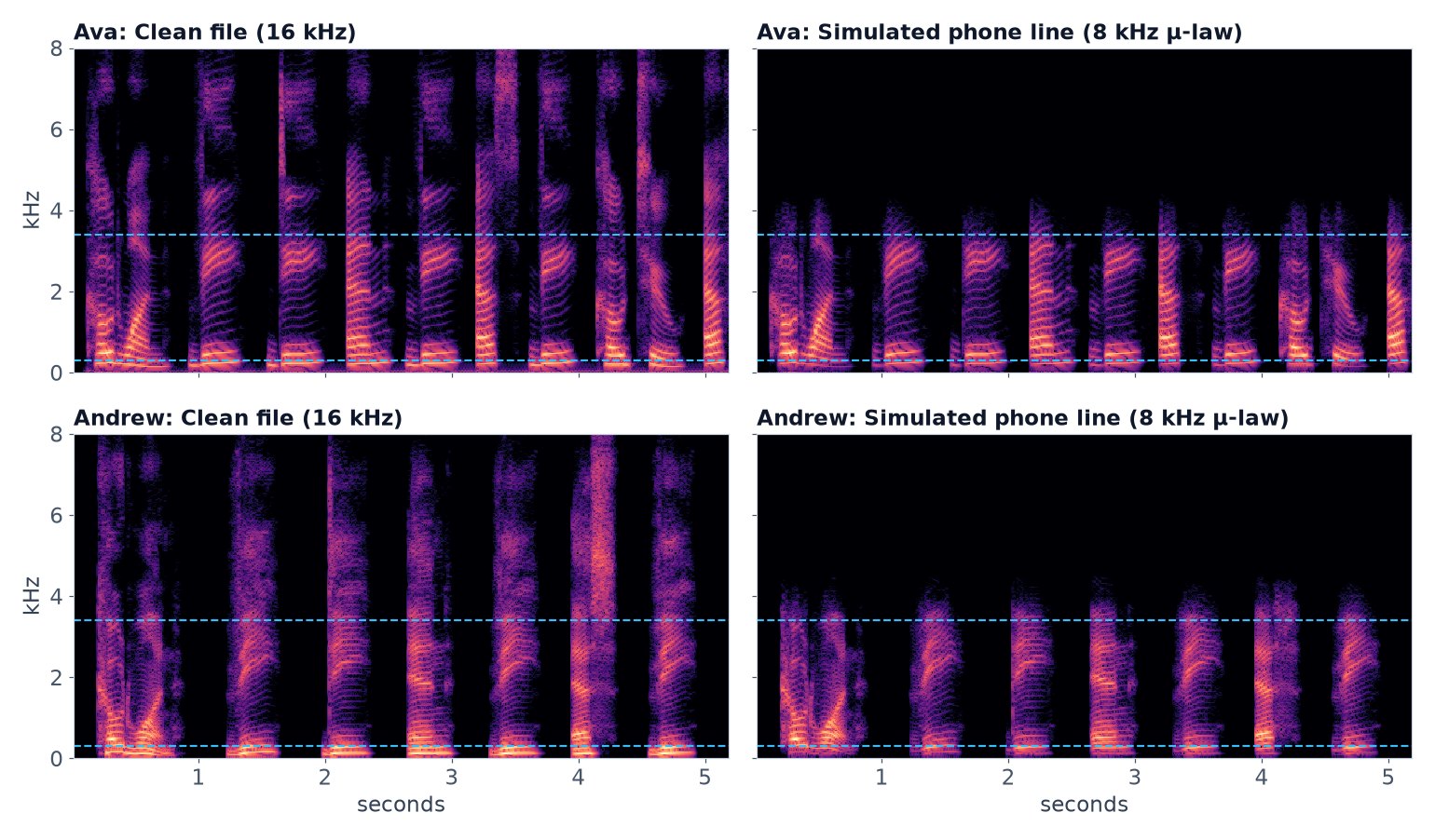
The first 5 seconds of the hard test script, clean (left) and on the simulated phone line (right). Dashed lines mark 300 Hz and 3,400 Hz.
Two things go. The hiss of S and F above 3,400 Hz is what tells those letters apart, and the line cuts it off. The body of the voice below 300 Hz goes too. Listen to the first 13 seconds of the test script, which is spelled-out letter codes, on each line:
Same file, three lines
“Code 1: V, D, N, V, S, V. Code 2: F, M, S, D, T, N…”
Clean file
Andrew, 48 kHz
Landline
300–3,400 Hz, μ-law
Weak mobile to landline
AMR-NB 4.75 kbps, then μ-law
Which voices lose the most
Ava, Andrew, Emma and Christopher read eight of the 33 scripts each; Ada read one and isn’t in this table. The table shows each voice’s medians, clean file against the simulated landline. “Below 300 Hz” is the share of the voice’s energy under 300 Hz.
Voice
Below 300 Hz
Level lost
ESTOI
Christopher
68% → 13.2%
6.1 dB
0.94
Andrew
60% → 7.4%
5.1 dB
0.92
Emma
59% → 11.9%
5.0 dB
0.93
Ava
26% → 3.3%
2.1 dB
0.95
The more of a voice’s energy sits below 300 Hz, the more level it loses on the line. That isn’t simply about deep voices. Emma’s voice is pitched higher than Andrew’s and still lost as much level: in the test script, 44% of Emma’s energy sat between 100 and 200 Hz. Ava kept the most, and scored highest. Level lost isn’t clarity lost, though: Christopher lost the most level and still scored 0.94, second only to Ava. If you’re choosing between voices, run your shortlist through a phone simulation (or call yourself) before you decide.
Landline, mobile and HD voice compared
ESTOI scores for the hard test script, by voice and line (1.0 means identical to the clean file):
Line
Ava
Andrew
Christopher
Emma
Landline
0.94
0.90
0.95
0.89
Mobile
0.90
0.86
0.86
0.82
Weak mobile
0.76
0.69
0.71
0.64
Mobile HD
0.91
0.87
0.85
0.86
G.722
0.99
0.99
0.99
0.99
Mobile is AMR-NB at 12.2 kbps, weak mobile is AMR-NB at 4.75 kbps passed on to a landline, and mobile HD is AMR-WB at 12.65 kbps. The landline alone costs little. The worst case is a caller on a low-bitrate mobile connection reaching a landline, where the voice is compressed twice. G.722 kept almost everything. Mobile HD voice (AMR-WB at 12.65 kbps) scored below the landline. ESTOI only analyzes frequencies up to about 4 kHz, so it gives no credit for the extra treble a wideband call carries. Emma scored lowest on the landline and both narrowband mobile lines, and Christopher on mobile HD. Christopher had the best landline score (0.95) but fell further than Ava on every mobile line. These scores are models; a person’s ear isn’t the same thing.
What a speech recognizer wrote down
ESTOI is a score, not words, and I can’t listen. So I ran the hard test script through an open speech recognizer as a stand-in listener, and checked what it wrote against the script. Each file took one to 17 minutes, so I ran 16 of the 24 files: every line for Andrew, and the clean file, the landline and the weak mobile line for the other three voices, plus mobile for Ava. Letters written down correctly, out of 36:
Voice
Clean
Landline
Weak mobile
Andrew
36
36
36, then stuck
Christopher
36
36
35
Emma
36
36
32
Ava
34
34
34
The landline cost no letters. All four voices scored the same on the simulated landline as on the clean file. Andrew also scored 36 on mobile, mobile HD and G.722, and Ava 34 on mobile.
Some misses were there before the line. Ava’s two misses were on every version, clean included: N written down as M in codes 3 and 6. The line didn’t cause them.
The weak mobile line is where it broke. Emma lost four letters there (D as V, M as N, B as V, D as B) and Christopher one (D as V). Ava stayed at 34 but one miss moved (F as S), and “gate” came back as “date” twice. On Andrew’s file the recognizer got stuck: it repeated parts of the script several times and lost “gate ninety”.
Numbers held up. Fifteen and fifty, thirteen and thirty and the other pairs came through on every file except Andrew’s stuck one.
Made-up names were the weak spot. From every clean file, Fiske came back as “Fisk”, Daskin as “Dasken” and the email domain as “Fiskasupply”. For two of the voices, Pelmora also became “Palmora”, and for two, Brevik became “Breivik”. A recognizer can’t know how an invented name is spelled, and a caller can’t either. Spell out anything they need to type.
A recognizer is a stand-in, not a person. It failed in a way a listener wouldn’t, getting stuck on Andrew’s weak mobile file, and a listener might miss what it caught. For a greeting the lesson matches the typed-line test: don’t make callers catch letters or invented spellings. Use plain words, and spell only what they must write down.
Upload specs by phone system
Here’s what each system’s own documentation says about greeting files, checked on October 20, 2026:
Two of these also explain why a file can sound worse than expected. Twilio warns that “128kbps mp3 files, will take longer to transcode and potentially sound worse than files that are in lossless 8kbps formats”. RingCentral says that on a narrowband codec a greeting “will playback at 8 kHz. If wideband (Opus or G7.22) is available, then 16 kHz will be used.”
No single file suits every system. Amazon Connect requires 8 kHz mono μ-law WAV, and Nextiva and RingCentral list it too. Teams asks for linear PCM WAV (or MP3), and Aircall takes MP3 only. One free command-line converter covers the list with these three commands:
I converted all 33 greetings with the first command. Loudness changed by 0.2 LU or less. Only two files touched the top of the μ-law range, and both had peaked within 0.6 dB of full scale before conversion. So leave about 1 dB of headroom, and match the loudness of all your greetings first.
The size limits hardly matter for greetings that run under 15 seconds. By my arithmetic:
Limit
File type
Fits about
Nextiva, under 2 MB
8 kHz μ-law WAV (8,000 bytes a second)
250 s
Nextiva, under 2 MB
8 kHz 16-bit WAV (16,000 bytes a second)
125 s
Teams, 5 MB
16 kHz 16-bit mono WAV
156 s
Zoom, 10 MB
128 kbps MP3
625 s
Recording notices and AI voices
This is a summary of the rules I found, not legal advice:
US federal law allows recording where “one of the parties to the communication has given prior consent” (18 U.S.C. § 2511).
Some states require everyone’s consent. Florida requires that “all of the parties to the communication have given prior consent” (Fla. Stat. 934.03). Washington accepts an announcement to all parties, and “if the conversation is to be recorded that said announcement shall also be recorded” (RCW 9.73.030).
In the EU and UK, GDPR requires telling people about data collection “at the time when personal data are obtained” (Art. 13). The UK ICO lists telling people “when you speak to someone on the telephone” as one way (right to be informed).
The FCC’s AI-voice ruling is about outbound calls. In 2024 it confirmed that the TCPA’s limits on “artificial or prerecorded voice” calls “encompass current AI technologies that generate human voices” (FCC 24-17). That covers calls you place. It doesn’t cover a greeting played to someone who called you.
A plain notice works in the main greeting: “This call may be recorded for quality and training.” The recording-notice script above includes it. Check the rules where you and your callers are. I found no law requiring an inbound greeting to say it uses an AI voice.
Before you go live: a 10-point checklist
Call the number from a mobile and from a landline, and listen to every greeting to the end.
Listen for clipped first words and cut-off endings.
Press every menu key, including the repeat key and 0.
Wait without pressing anything, and check the menu doesn’t hang up on you.
Check the switch to after-hours mode, and its time zone.
Test the emergency or urgent route reaches a person.
Compare volume across the greeting, the menu, the hold messages and the music.
Leave a test voicemail and check where it arrives.
Put a reminder in your calendar to remove each holiday greeting.
Reread every greeting when your hours, staff or extensions change.
FAQ
How long should a professional voicemail greeting be?
Under 10 seconds, about 30 words. The voicemail greetings on this page ran 4.5 to 10.1 seconds, and all but one came in under 10. Other guides suggest 10–15 or 20–30 seconds, without citing a study.
What is the best audio format for uploading a greeting?
It depends on the system. Amazon Connect requires 8 kHz mono μ-law WAV, Teams takes linear PCM WAV or MP3, and Aircall takes MP3 only. The upload specs section has each system’s rules and a conversion command for each format.
Why does my greeting sound muffled or tinny on calls?
A narrowband call keeps only about 300–3,400 Hz. The bass and the hiss of S and F are gone. In my test, voices lost 2 to 6 dB of level on the simulated line. Pick a voice that holds up, keep it clear of music, and don’t upload a high-bitrate MP3 when the system asks for 8 kHz.
Should you use background music in a voicemail greeting?
On hold, music is normal. Keep it 18 to 24 dB under the voice: in my test, music at 12 dB under cost as much intelligibility as the phone line itself. In a voicemail greeting, music only makes the greeting longer and harder to hear.
Should I record my greeting myself or use an AI voice?
Record it yourself if you want callers to hear the person they’ll speak to. Use an AI voice, or your phone system’s text-to-speech, if you want to change greetings often, keep one voice across many prompts, or don’t have a good room to record in. Either way, test the result on a real call.
Are there legal requirements for business voicemails?
Recording calls needs consent, and some places require it from everyone on the call. In the EU and UK, data rules require you to tell callers. See recording notices for the sources. Check the rules where you and your callers are.
How many options should an IVR menu have?
No more than six, according to ETSI ETR 096. Start at 1, offer a repeat, and always offer a way to reach help.
Can I have different greetings for business hours and after hours?
Yes, in most business phone systems. Google’s auto attendant says that “For calls outside your working hours, the auto attendant can play an alternate greeting”. Teams auto attendants allow one after-hours call flow and unlimited holiday call flows.
How often should I update my greeting?
I found no source for a fixed schedule. Update it whenever what it says changes: hours, holidays, staff, extensions or menu options.
Methods: 300–3,400 Hz band-pass filtering; G.711 μ-law, AMR-NB, AMR-WB and G.722 encoding; EBU R 128 loudness; the ESTOI intelligibility score; speech recognition as a stand-in listener.