Text to Speech for Video The Complete Guide
Using text to speech for video is a total game-changer. It lets you create professional, human-sounding voice-overs straight from a script. Forget about the hassle of microphones, booking voice actors, or paying for expensive studio time. It’s a much faster and more affordable way to get high-quality narration for any video you’re working on.
The New Era of Video Narration with AI
Do you remember the old way of doing voice-overs? It was a real headache—a complicated, expensive process that could bring video production to a grinding halt. You had to find the right voice actor, book a pricey studio, and then deal with endless edits and retakes. If you needed to change just one sentence in the script, you often had to start the whole recording process over again. What a waste of time and money.
This traditional workflow was a huge roadblock, especially for solo creators, small businesses, and marketing teams trying to meet tight deadlines. The logistics and costs often made professional-grade narration feel completely out of reach.
From Complex to Effortless
Modern text to speech for video completely flips the script. It takes a resource-heavy task and turns it into something anyone can do. Instead of trying to coordinate with outside talent, you suddenly have a digital voice actor on call 24/7.
This technology puts the power back in your hands, allowing you to:
- Generate voice-overs instantly: Go from a written script to polished audio in minutes, not days.
- Edit with total ease: Need to fix a typo or tweak a sentence? Just edit the text and regenerate the audio. Simple.
- Keep your brand consistent: Use the same voice across all your videos for a sound that’s instantly recognizable and professional.
- Scale up your content production: Create narrations for a whole batch of videos at once without any logistical nightmares.
This leap forward is all thanks to huge improvements in artificial intelligence. The robotic, monotone voices from a few years ago are gone. Today’s AI platforms can produce stunningly realistic narration with all the subtle tones, pacing, and inflections that make it sound genuinely human.
The global Text-to-Speech (TTS) market really shows how big this shift is. It was valued at around USD 3.19 billion in 2024 and is expected to rocket to USD 12.4 billion by 2033. This massive growth proves just how essential TTS has become for modern content creation.
A Flexible and Creative Workflow
By knocking down the old barriers to high-quality audio, text-to-speech technology makes video production way more flexible and efficient. It puts creative control right where it belongs—with you, the creator.
You can experiment on the fly, testing different voices, adjusting the pacing, and perfecting your message without ever leaving your desk. For more great articles and insights into the evolving world of AI video narration, check out resources like TheClipbot's blog. This newfound freedom lets you focus on what really matters: telling a great story.
How Text to Speech for Video Actually Works
Ever wonder what’s happening under the hood when you turn a script into a voiceover? The tech behind text to speech for video isn't magic, but it’s pretty darn close. Think of it as a digital voice actor, ready 24/7 to read any line you give them with the perfect delivery. It all breaks down into a few clear steps that take plain text and turn it into engaging audio.
Modern text-to-speech (TTS) is built on some seriously smart artificial intelligence—specifically, neural networks. These systems are trained on massive libraries of human speech, which lets them learn all the tiny patterns, rhythms, and quirks that make a voice sound natural. This is a huge leap from the robotic, choppy voices we all remember from the past.
From Text Analysis to Sound Wave Generation
First up, the AI has to understand your script. When you paste in your text, the system does a deep linguistic analysis. It’s not just reading words; it's figuring out context, grammar, and punctuation. The AI identifies sentence structure and even tries to interpret the emotion behind the words. Getting this first step right is key to creating a voiceover that actually flows.
Next, the system gets to work on phonetic conversion. It translates your text into phonemes, which are the basic building blocks of sound in a language. For example, the word "cat" is broken down into three phonemes: "k," "æ," and "t." This phonetic script is basically the blueprint for the final audio.
This graphic gives you a simple visual of how a script becomes a full-fledged video narration.
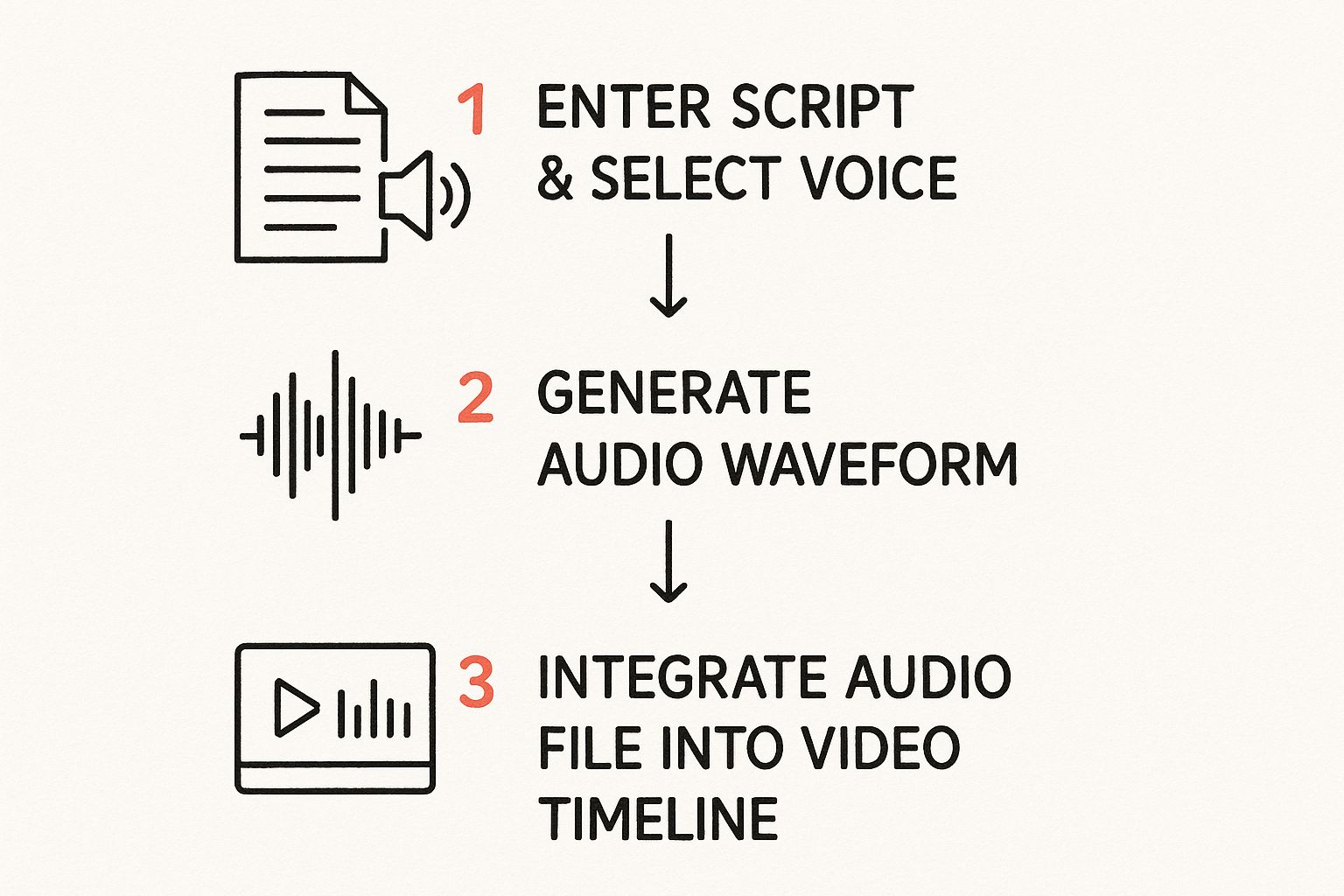
As you can see, the whole journey is designed to be straightforward and efficient for you, the creator.
The last and most impressive step is waveform synthesis. Using that phonetic blueprint, the AI generates the actual audio waveform—a digital representation of sound. This is where all that training on human speech really shines. The neural network predicts and builds the sound wave from scratch, layering in all the subtle details that make a voice feel real.
Mastering Prosody and Intonation
What really sets modern AI voices apart is their handle on prosody. It’s a technical-sounding term, but it just means the rhythm, stress, and intonation of speech. These are the elements that inject meaning and emotion into our words. It's the difference between a flat, boring statement and an exciting, compelling question.
Think of it like music. A sheet of notes is just data, but a great musician plays them with feeling, changing the tempo and volume to create a performance. A high-quality TTS engine does the exact same thing with your script.
Prosody is what allows an AI voice to sound genuinely human. It’s the AI’s ability to understand when to pause for dramatic effect, raise its pitch at the end of a question, or place emphasis on a key word to drive a point home.
Here’s a quick look at how it all comes together:
- Pitch: The AI adjusts the highness or lowness of the voice to signal questions, statements, or excitement.
- Pacing: It modifies the speed of speech, maybe slowing down for important points or speeding up a bit for less critical info, just like in a natural conversation.
- Emphasis: The system can stress specific words or phrases to make them pop, exactly how a human speaker would.
This level of control over vocal delivery is what allows a tool like Lazybird to offer a whole library of voices, each with its own character and style. You aren’t just converting text anymore; you're directing a vocal performance. It gives you the power to craft a voiceover that perfectly matches your video’s tone and truly connects with your audience.
Why AI Voice Overs Are a Game Changer for Creators

When you start weaving AI voices into your video workflow, you unlock some seriously powerful benefits that you can feel right away—in your wallet, on your watch, and in your creative freedom. It’s way more than just a cool new trick; it fundamentally changes the game of content production.
Let's break down the four biggest reasons why text to speech for video has become a must-have tool for everyone, from solo YouTubers to big corporate teams. Each one tackles a classic headache in video production, offering a smarter, faster way to work.
Dramatic Cost Reduction
Let's start with the most obvious win: the money you save. Hiring a professional voice actor is great, but it's not cheap. You're paying for their talent, sure, but also for studio time, sound engineers, and the inevitable re-takes. That can easily run you hundreds, if not thousands, of dollars for a single video.
AI voiceovers basically wipe those costs off the board. With a tool like Lazybird, you get a whole library of studio-quality voices for a tiny fraction of the price. This makes it possible for creators and businesses of any size to produce professional-sounding content without blowing their budget.
Before we go further, let's look at a quick comparison to really see the difference.
Comparing Traditional Voice Overs with AI Narration
This table breaks down the core differences between the old-school way and the new AI-powered approach.
| Factor | Traditional Voice Over | AI Text to Speech for Video |
|---|---|---|
| Cost | High initial cost (hundreds to thousands per project) | Low, predictable subscription fee |
| Time | Days or weeks (casting, recording, editing, revisions) | Minutes (generate audio on the spot) |
| Revisions | Costly and time-consuming; requires new sessions | Instant and free; just edit the text and re-generate |
| Flexibility | Limited; locked into one actor's schedule and style | Nearly infinite; switch voices, languages, and styles in seconds |
| Availability | Dependent on the actor's schedule | Available 24/7, on-demand |
As you can see, AI just gives you more control and predictability, which is a massive advantage when you're trying to produce content consistently.
Unmatched Speed and Flexibility
Picture this: you've just finished editing a video, and you notice a tiny typo in the script. Or maybe you decide a sentence just doesn't land right. With a human voice actor, that's a huge pain. You have to get in touch, book another session, and wait for the new file. Your whole project could be stalled for days.
With AI? It's a non-issue. You just tweak the text, hit "generate," and you have a new audio file in seconds.
This agility is a true superpower for content creators. It lets you experiment and get your message just right without the fear of expensive and slow re-recordings.
This kind of speed is a key piece of the puzzle for creating a more efficient production cycle. It's one of many workflow automation examples that show how AI tools can fit into a bigger strategy to get more done.
Rock-Solid Brand Consistency
If you're making a video series, brand consistency is everything. Relying on the same voice actor for every single project can get tricky. People get busy, schedules clash, and suddenly your brand voice is all over the place, which can confuse your audience.
AI-powered text to speech for video nails this problem.
- A Single, Reliable Voice: You can pick an AI voice that perfectly captures your brand's vibe and use it for everything, from tutorials to social media clips.
- Guaranteed Availability: Your brand's voice is ready to go 24/7. No scheduling conflicts, ever.
- Scalable Identity: As you ramp up content production, your audio branding grows right along with you, making your identity stronger with every new video.
This kind of consistency is how you build real recognition and trust. Need help finding that perfect voice? Check out our guide on choosing the best AI voice over generator.
Enhanced Accessibility for All
Finally, let's talk about making your content for everyone. A clear, well-spoken narration is a massive help for viewers with visual impairments or reading difficulties. By adding an audio track to any on-screen text, you're making sure your message can connect with people, no matter how they consume content.
This isn't just a nice thing to do; it's becoming a worldwide standard. The Text-to-Speech market was valued at around USD 3.45 billion in 2024 and is expected to explode to USD 28.02 billion by 2034. Why? A huge part of that growth is driven by the global push for better accessibility. Adding an AI narration is a simple and effective step toward making your content more inclusive and reaching a much wider audience.
Popular Use Cases for AI Video Narration
The real magic of text to speech for video happens when you see what it can do in the real world. This isn't some niche gadget for developers; it's a super-flexible tool that creators and businesses are using to solve all sorts of problems. From educational videos to social media ads that actually convert, AI narration is putting studio-quality audio within everyone's reach.
Let's dig into some of the most common ways people are using AI voices to take their videos to the next level. You might even get a few ideas for your next project.
Compelling Explainer Videos
Explainer videos have one job: take a complex idea and make it dead simple. To pull that off, the narration has to be perfectly clear, concise, and easy to listen to. This is where an AI voice truly shines, delivering a flawless read of your script every single time.
You never have to worry about a human narrator fumbling over technical jargon or sounding tired by the end of the script. With a tool like Lazybird, you can pick a voice that sounds both authoritative and friendly, helping you build trust and get your point across without any distracting hiccups.
The big win here is precision. An AI voice hits every word perfectly, which is non-negotiable when you're explaining the nuts and bolts of a product or service.
And think about updates. When your product gets a new feature, you don't have to track down your original voice actor and book another session. Just tweak the script, click a button, and your explainer video is updated in minutes.
Engaging E-Learning and Corporate Training
Online education is absolutely exploding. To hold a learner's attention, the material needs to be dynamic and easy to digest. AI narration lets educators and trainers turn dense documents and static slideshows into genuinely engaging audio-visual lessons.
The impact this has on learning is huge:
- Makes Content Accessible: It's a game-changer for people who learn best by listening or for those who have reading difficulties.
- Boosts Retention: When you hear information while also seeing it on screen, it just sticks better.
- Scales Production: A single instructor can create a whole library of narrated training modules without ever needing a microphone.
The growth here is impossible to ignore. The Text-To-Video AI market was valued at $0.31 billion in 2024 and is expected to jump to $0.4 billion by 2025. A huge chunk of that growth comes from the demand for scalable digital learning content. You can find more insights on this rapid market expansion on The Business Research Company.
Consistent YouTube and Social Media Content
For anyone creating content on YouTube or social media, consistency is everything. Pumping out videos on a regular schedule is tough enough, but ensuring every single one has clean, high-quality audio is a whole other challenge. Bad acoustics, a cheap mic, a noisy neighbor—so many things can go wrong.
This is exactly why text to speech is a creator's best friend.
AI narration gives you a consistent brand voice for all your videos. Whether you're making listicles, tutorials, or news updates, your channel develops a signature sound that people instantly recognize. It also takes the pressure off. No more re-recording a whole video because a dog started barking or you had a sore throat. For many, it's the key to a sustainable 15-minute social media video formula that lets you create more content, faster.
Choosing the Right Text to Speech Tool
With the market for text to speech for video exploding, the number of tools available has shot through the roof. Picking the right one can feel like navigating a maze, but it really boils down to just a few key things that will directly impact your workflow and the final quality of your narration.
If you focus on these core areas, you can cut through the noise and find a platform that not only checks all the technical boxes but also just feels right to use. A great tool should make your life easier, not add another frustrating layer to your video production.
Voice Quality and Variety
The absolute most critical factor is the quality of the AI voices. You need voices that sound genuinely human, complete with natural pacing and emotion. When you're testing tools, listen closely to the samples—do they sound flat and robotic, or can you hear the subtle nuances of a real person speaking?
Beyond pure quality, look at the variety on offer. A deep library of voices gives you the creative freedom to match the narration perfectly to your content's vibe.
- Diverse Accents and Languages: Can the tool handle different regional accents and multiple languages? This is a must-have if you're trying to connect with a global audience.
- Range of Styles: Look for a good mix of voice styles. You might need something energetic for a marketing video, calm and clear for a tutorial, or casual and conversational for a vlog.
- Emotional Nuance: The best tools let the voices convey actual emotions, like excitement or seriousness. This is what makes a video truly engaging.
Having a wide selection means you can keep your brand voice consistent while still tailoring the narration to each specific project.
Customization and Control
Generating the voice is just step one. The real magic happens when you start fine-tuning it. The ability to control the tiny details of the narration is what separates a decent tool from a truly professional one. You want granular control over the vocal performance to make sure it lines up perfectly with your vision.
Think of it like directing a human voice actor. The more control you have over the pitch, speed, and pauses, the more polished and professional your final voice-over will sound.
Keep an eye out for these essential customization options:
- Speed and Pacing: Can you adjust how fast or slow the voice speaks? This is vital for syncing the narration with the action on screen.
- Pitch and Tone: Changing the pitch can completely alter the feel of a sentence, making it sound more like a question, a firm statement, or an excited announcement.
- Pauses and Emphasis: The power to add a strategic pause before a big reveal or to emphasize a specific word can dramatically improve the clarity and impact of your message.
Ease of Use and Integration
Finally, even the most advanced tech is useless if it's a nightmare to use. A clean, intuitive interface isn't just a nice-to-have; it's essential. You shouldn't need to read a dense manual just to generate a simple voice-over. The process should feel natural: paste your script, pick a voice, make your tweaks, and get your audio file.
Also, consider how the tool fits into the way you already work. How easy is it to get the finished audio? The platform should let you download high-quality files (like MP3 or WAV) that you can just drag and drop right into your video editor.
Platforms like Lazybird really nail this by combining a massive library of high-quality, customizable voices with an incredibly simple interface. This balance ensures you get a professional result without the steep learning curve. To learn more, check out our guide to text-to-speech generators, which breaks down even more features to look for.
Create Your First AI Voice Over with Lazybird
So, are you ready to see just how easy it is to get a professional-sounding voice over for your video? Getting your first project up and running with Lazybird is designed to be completely painless. This quick walkthrough will show you how to turn a simple script into polished audio in just a few minutes.
We built the whole thing for speed and simplicity. The goal is to let you focus on your creative work, not get stuck wrestling with complicated software. You don’t need a fancy microphone or any technical know-how—just your script and your idea.
The Three-Step Process
At its heart, making a voice over in Lazybird is just three simple steps. We designed each one to give you total control with the least amount of hassle, so you can count on a great result every single time.
Paste Your Script: It all starts in our clean, simple editor. Just copy your written script and paste it right into the text box. The interface is designed to be clutter-free, letting you see everything at a glance and make any last-minute tweaks before you create the audio.
Select the Perfect Voice: This is where the magic happens and your narration starts to take shape. You can browse through Lazybird's huge library of natural-sounding AI voices, filtering them by language, gender, and style to find the exact tone that fits your brand. Need something energetic for a social media ad? Or maybe a calm, authoritative voice for a training module? You'll find it here.
Generate and Refine: Once your script is in and you’ve picked a voice, just hit "Generate." In a few moments, Lazybird creates the audio file. From there, you can start making small adjustments to the pacing, pitch, and tone to make sure every word has the right impact.
Fine-Tuning Your Narration
After the first audio file is generated, you get to put on the finishing touches. This is where you can add those subtle, professional details that make the narration feel uniquely yours.
The ability to instantly adjust pacing and add strategic pauses is a game-changer. It allows you to perfectly sync your narration to your video's visuals, creating a seamless and engaging viewing experience without the need for complex audio editing software.
Want to add a little dramatic pause right before a key point? You can do it with a click. Need to slow down a sentence to let an important idea really sink in? That’s just as easy. This level of control means the final audio is exactly what you had in mind.
To see just how fast this all is, check out our guide on how to create an AI voice over for videos in minutes. You can see for yourself how quickly you can produce a studio-quality voice over for your next project.
Got Questions About TTS for Video? We've Got Answers.
As you start digging into the world of text-to-speech for video, you're bound to run into a few questions. It’s totally normal. Getting those cleared up is the key to feeling confident and making this tech work for you.
Let's walk through some of the most common things creators ask, from how real these voices actually sound to whether YouTube will flag your monetized channel.
Can AI Voices Actually Sound Human?
This is usually the first thing people wonder about, and for good reason. We all remember those clunky, robotic voices from a decade ago. But the answer today is a definite yes. Modern AI voices are built completely differently.
These new TTS systems learn from massive libraries of actual human speech, so they pick up on the tiny details—the pauses, the changes in pitch, and the rhythm that makes speech feel natural. They don't just read words; they understand the context. This allows them to deliver a narration with authentic prosody, putting emphasis in the right places.
Are they perfect for conveying deep sarcasm or complex acting? Maybe not yet. But for narrating tutorials, explainers, and marketing videos, the quality is so good it's often impossible to tell the difference from a human voice actor.
Can I Use an AI Voice on My Monetized YouTube Channel?
This is another big one. Nobody wants to jeopardize their YouTube channel. The good news is that YouTube is perfectly fine with TTS voices, as long as you’re creating content that’s valuable and original.
YouTube’s main goal is to avoid low-effort, spammy videos. If your video has great visuals, a well-written script, and offers real commentary or information, using an AI voice for the narration won't stop you from joining the YouTube Partner Program.
The trick is to think of the AI voice as a tool that enhances your original work, not as a shortcut to pump out content with zero effort. Your creativity, editing, and the value you provide are what really count.
How Do I Actually Add the Audio to My Video?
Okay, so you've used a tool like Lazybird to generate the perfect voice-over. Now what? Getting that audio file into your video project is incredibly simple. The process is pretty much identical across all major video editors, whether you're using Adobe Premiere Pro, DaVinci Resolve, or CapCut.
It really just boils down to three simple steps:
- Generate and Download: Once you’re happy with the script and voice, download the audio file. Most TTS tools, including Lazybird, will let you export it as a high-quality MP3 or WAV file.
- Import to Your Editor: Open your video editing software and import that audio file into your project. You'd do this the same way you'd import music or any other sound effect.
- Drop it on the Timeline: Drag the audio clip onto your timeline, usually on its own dedicated audio track. From there, just slide it around to make sure the narration lines up perfectly with what’s happening on screen.
And that’s it. You've just integrated a professional, clean-sounding AI voice-over right into your video.
Ready to create your own professional voice overs in minutes? With Lazybird, you get access to hundreds of human-like voices in over 100 languages. Just paste your text, choose a voice, and generate studio-quality audio instantly. Try it now at https://lazybird.app.
